

Description
Download FeedForAll Mac – Powerful RSS & Podcast Publishing Tool
Overview
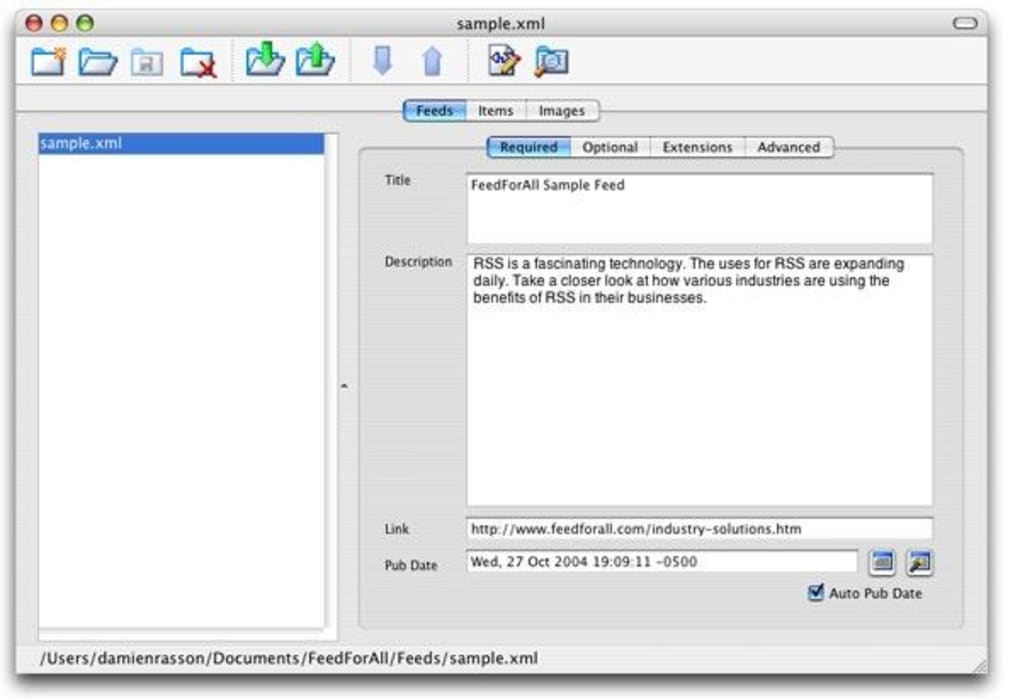
FeedForAll for Mac is a lightweight yet feature‑rich RSS publisher designed for anyone who wants to create, edit, and publish RSS feeds without a steep learning curve. The application shines thanks to its intuitive wizard, which walks newcomers through every step of feed creation—from basic news syndication to complex podcast and video‑cast setups. The sleek interface supports multiple skins, letting you tailor the look to your personal taste while you focus on content. Its built‑in WYSIWYG HTML editor makes it simple to add images, format text, and embed multimedia, ensuring your feed looks polished on all platforms. Recent updates have broadened the tool’s capabilities: full iTunes and MediaRSS namespace support, unified publishing for attached media files, and live spell‑checking to catch errors before they go live. While FeedForAll does not double as an RSS reader, it excels as a dedicated publishing engine, making it an excellent choice for webmasters, bloggers, podcasters, and small media outlets who need a secure, fast, and free‑to‑try solution for syndicating content on the web.
Key Features
- Guided Feed Wizard: Step‑by‑step wizard that supports standard RSS, iTunes podcast, and MediaRSS namespaces.
- WYSIWYG HTML Editor: Drag‑and‑drop images, format text, and preview feed output in real time.
- Multi‑Skin Interface: Choose from several skins or create custom themes to match your branding.
- Unified Publishing: Upload audio, video, or document files together with your feed, eliminating separate hosting steps.
- Live Spell Checking & Image Manipulation: Built‑in tools keep your content error‑free and visually appealing.
- Namespace Extensibility: Supports every major RSS namespace, making it easy to add new tags without manual coding.
- Clone & Export Functions: Duplicate existing feeds, export to XML, or copy feeds for rapid reuse.
- Secure Publishing: Supports HTTPS uploads to popular hosting services, ensuring your feed is delivered safely.
- Free Trial & Affordable License: Try the full feature set without cost; a single‑user license is inexpensive for long‑term use.
- Regular Updates: Automatic update notifications keep the app compatible with the latest macOS releases.
Each of these features works together to provide a seamless publishing experience. For example, the wizard’s extended support for iTunes extensions means podcasters can add episode‑specific metadata—such as duration, explicit content flags, and season numbers—without ever leaving the application. Meanwhile, the WYSIWYG editor’s image manipulation tools let you resize, crop, and add alt‑text to pictures, improving both accessibility and SEO. The unified publishing model is particularly valuable for creators who host large media files; you can attach an MP3 directly to the feed, and FeedForAll handles the correct MIME type and enclosure tags automatically. All of this is wrapped in a secure, Mac‑optimized package that respects Apple’s sandboxing standards, giving you confidence that your feed won’t expose vulnerabilities during upload.
Installation & Usage Instructions
Step‑by‑Step Installation
1. Download the installer: Visit the official FeedForAll website and click the “Download for macOS” button. The file is a signed .dmg, ensuring a secure download.
2. Mount the disk image: Double‑click the .dmg file; macOS will open a new window showing the FeedForAll app icon.
3. Copy to Applications: Drag the FeedForAll icon into your Applications folder. macOS may ask for your administrator password to complete the copy.
4. Open the app: Navigate to Applications, locate FeedForAll, and double‑click to launch. The first launch will prompt you to allow the app to access your Documents folder—grant permission to enable easy file import.
5. Activate your license (optional): If you purchased a license, enter the provided key in the “Preferences → License” pane. The trial version remains fully functional for 30 days.
Getting Started with the Wizard
Upon first opening FeedForAll, you’ll be greeted by the welcome screen with a prominent “Create New Feed” button. Clicking this launches the wizard, which asks for basic information such as feed title, description, and primary language. Subsequent steps let you select a feed type—News RSS, Podcast (iTunes), or Video (MediaRSS). Each choice automatically loads the appropriate namespace tags, so you never have to remember the exact XML syntax. The wizard also offers a preview panel where you can see how your feed will appear in popular readers and podcast apps.
Editing and Publishing
After the wizard creates a skeleton, the main editor opens. Here you can add items (articles, episodes, or videos) using the “Add New Item” button. The WYSIWYG editor lets you type or paste content, insert images via drag‑and‑drop, and embed media URLs. For podcast episodes, you can upload the audio file directly; FeedForAll will generate the correct
The overall workflow is designed for speed: from initial wizard launch to published feed, most users can complete the process in under ten minutes, even for complex podcast feeds with multiple episodes. This efficiency, combined with the visual editing tools, makes FeedForAll one of the most user‑friendly RSS publishing solutions on macOS.
Compatibility, Pros & Cons
Operating System Support
FeedForAll is built specifically for macOS and supports versions from macOS 10.13 (High Sierra) through the latest macOS release (as of 2025). The application runs natively on Apple Silicon (M1, M2, and later) without requiring Rosetta translation, delivering smooth performance even when handling large media files. While the primary focus is macOS, the same company offers Windows and Linux versions of FeedForAll, but this review concentrates on the Mac edition.
Pros
- Intuitive wizard that reduces the learning curve for beginners.
- Comprehensive namespace support, including iTunes and MediaRSS.
- WYSIWYG editor with live preview, image tools, and spell checking.
- Unified publishing eliminates the need for separate file hosting.
- Regular updates keep the software compatible with the latest macOS security standards.
- Reasonable one‑time purchase price after the free trial.
Cons
- No built‑in RSS reader; users must rely on external apps for feed consumption.
- Advanced XML tweaking still requires manual editing for very niche use cases.
- Limited collaboration features—multiple users cannot edit the same feed simultaneously.
- Interface, while sleek, may feel dated compared to modern web‑based editors.
Overall, the benefits outweigh the drawbacks for most solo publishers and small teams. The lack of an integrated reader is mitigated by the fact that the primary goal of FeedForAll is content creation, not consumption. Users who need collaborative editing might pair FeedForAll with a version‑control system like Git for advanced workflows.
Frequently Asked Questions
Is FeedForAll free to use?
FeedForAll offers a 30‑day free trial with full feature access. After the trial, a one‑time license fee unlocks the software permanently. There is no recurring subscription.
Can I create iTunes‑compatible podcast feeds?
Yes. The latest version includes full iTunes namespace support, allowing you to add episode metadata, artwork, and explicit content flags directly from the wizard.
What file formats can I upload with my feed?
FeedForAll supports common audio formats (MP3, AAC, M4A), video formats (MP4, MOV), and standard document types (PDF, DOCX). The unified publishing tool automatically sets the correct MIME type.
Does the app work on Apple Silicon Macs?
Yes. FeedForAll runs natively on M1, M2, and later chips, delivering faster load times and lower power consumption compared to Rosetta‑emulated versions.
How do I publish my feed to a web server?
The built‑in publishing wizard supports FTP, SFTP, and WebDAV. Simply enter your server credentials, choose the destination folder, and click “Publish.” The app also validates the XML before uploading.
Conclusion – Should You Download FeedForAll Mac?
If you need a secure, fast, and easy‑to‑learn tool for creating RSS, podcast, or video feeds on macOS, FeedForAll is one of the best options available. Its guided wizard, powerful WYSIWYG editor, and comprehensive namespace support streamline the entire publishing workflow, allowing even beginners to produce professional‑grade feeds in minutes. While it lacks an integrated reader and advanced collaboration tools, these omissions are minor for most solo creators and small teams. The one‑time purchase after a generous trial period makes it a cost‑effective solution for long‑term use. Download FeedForAll Mac today, start your free trial, and experience hassle‑free feed publishing.
Guides & Tutorials for FeedForAll Mac
How to install FeedForAll Mac
- Click the Preview / Download button above.
- Once redirected, accept the terms and click Install.
- Wait for the FeedForAll Mac download to finish on your device.
How to use FeedForAll Mac
This software is primarily used for its core features described above. Open the app after installation to explore its capabilities.
User Reviews for FeedForAll Mac 0
No reviews found





.webp)